# Thiết lâp và thông số

[**https://www.espressif.com/en/support/download/other-tools**](https://www.espressif.com/en/support/download/other-tools)

<table data-header-hidden><thead><tr><th width="90"></th><th width="171"></th><th></th></tr></thead><tbody><tr><td>STT</td><td>File Code nạp</td><td>Tham số</td></tr><tr><td>1</td><td>firmware.bin</td><td>0x10000</td></tr><tr><td>2</td><td>bootloader.bin</td><td>0x1000</td></tr><tr><td>3</td><td>partitions.bin</td><td>0x8000</td></tr><tr><td>4</td><td>spiffs.bin</td><td>0x310000</td></tr></tbody></table>

<figure><img src="/files/wz5juDWYlugD4c2LEVqp" alt=""><figcaption><p>0x10000 0x1000  0x8000 0x310000  </p></figcaption></figure>

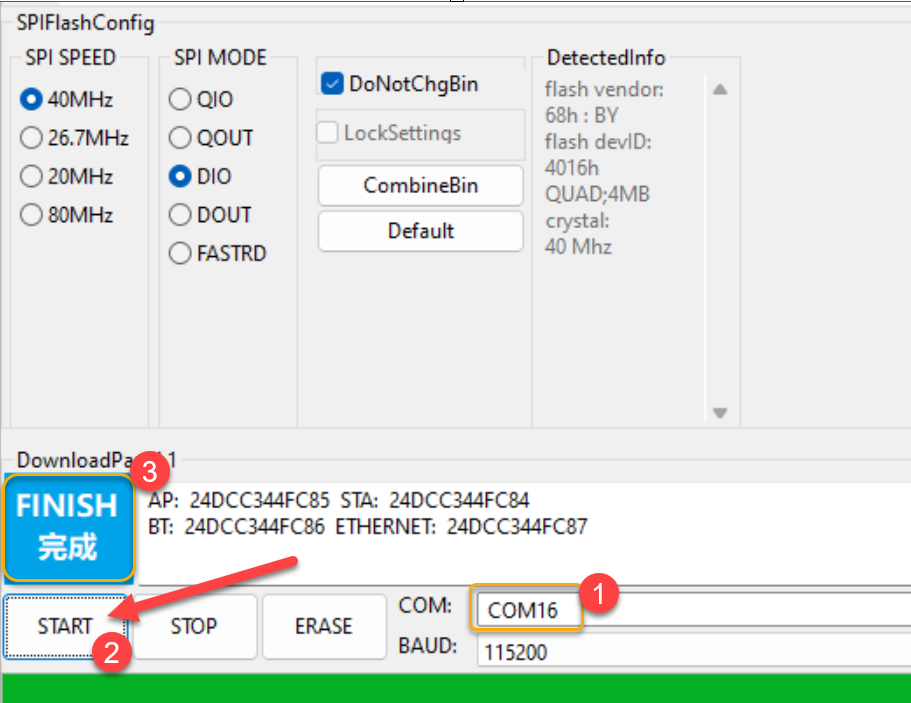
Bắt đầu nạp code :&#x20;

<figure><img src="/files/Cst724C3Lqfike56j8nN" alt=""><figcaption><p>Chú ý, chọn đúng cổng COM</p></figcaption></figure>

1. **Cách kiểm tra và chọn cổng COM kết nối**

![Cần chọn đúng cổng COM](/files/tima3qZmyEycNMCKMlyG)

Lưu ý cổng COM dùng để kết nối là cổng xuất hiện sau khi cắm dây kết nối vào thiết bị

1. **BAUD = 46080**                        ![](/files/PqhvMceO2eXL6pkZzzri)
2. **Start và đợi Finish**

![Khi hiện Flash là lết nối thành công](/files/YmKZH1BidZnQrJDuTaYK)

1. **Kết nối QR Box**

   1. **Kết nối WIFI**
   2. Sau khi hoàn tất nạp code màn hình QR code sẽ đứng ở màn hình chờ

2. ###

* Tìm WIFI theo mẫu&#x20;
* **Nhập password: 0922333636**

![Chọn Wifi của mạch để Kết nối nội bộ với mạch](/files/qPJAjAti4zzVQGJ7jPio)

* Nhập WIFI đang sử dụng và submit

![Khai báo mật khẩu wifi có kết nối internet để kết nối thiết bị với Mạng internet](/files/vUrwgkTO4XlqpnrZWcci)

**Sau khi submit thành công**

![](/files/56QeBTAidXHfvsA0dJQQ)Hệ tống thông báo thành công, thiết bị tự động khởi động lại

* 1. **Kích hoạt QR Box**
* **Sử dụng App VietQR để quét mã**

Sử dụng APP VIETQR Để quét QR thiết bị và gán tài khoản ngân hàng cho Voice box QR.

[**https://esp-web-tool-f1qv.vercel.app**](https://esp-web-tool-f1qv.vercel.app/)

<figure><img src="/files/lgiVNzca0G70MSkCGeaS" alt=""><figcaption><p>Đấu dây từ mạch PCB sang loa</p></figcaption></figure>

T&#x20;


---

# Agent Instructions: Querying This Documentation

If you need additional information that is not directly available in this page, you can query the documentation dynamically by asking a question.

Perform an HTTP GET request on the current page URL with the `ask` query parameter:

```
GET https://doc.vietqr.vn/doc/giai-phap-va-ung-dung-vietqr/qr-voice-box/thiet-lap-va-thong-so.md?ask=<question>
```

The question should be specific, self-contained, and written in natural language.
The response will contain a direct answer to the question and relevant excerpts and sources from the documentation.

Use this mechanism when the answer is not explicitly present in the current page, you need clarification or additional context, or you want to retrieve related documentation sections.